← Projects — CIS 249
Terzic Inc Banking System
A console-based Java banking application that supports account creation, deposits, fund transfers, and persistent file-based account storage.
Overview
Terzic Inc Banking System is a console-driven Java application that simulates core banking operations. Users can open new accounts, view account details, make deposits, transfer funds between accounts, and browse the full bank database. All account data is persisted as individual .txt files in a local Bank Accounts directory, with each file storing the account holder’s name, account number, and current balance.
Features
- Account creation with an automatically generated random 8-digit account number
- Deposit funds into any existing account with enforced min/max limits
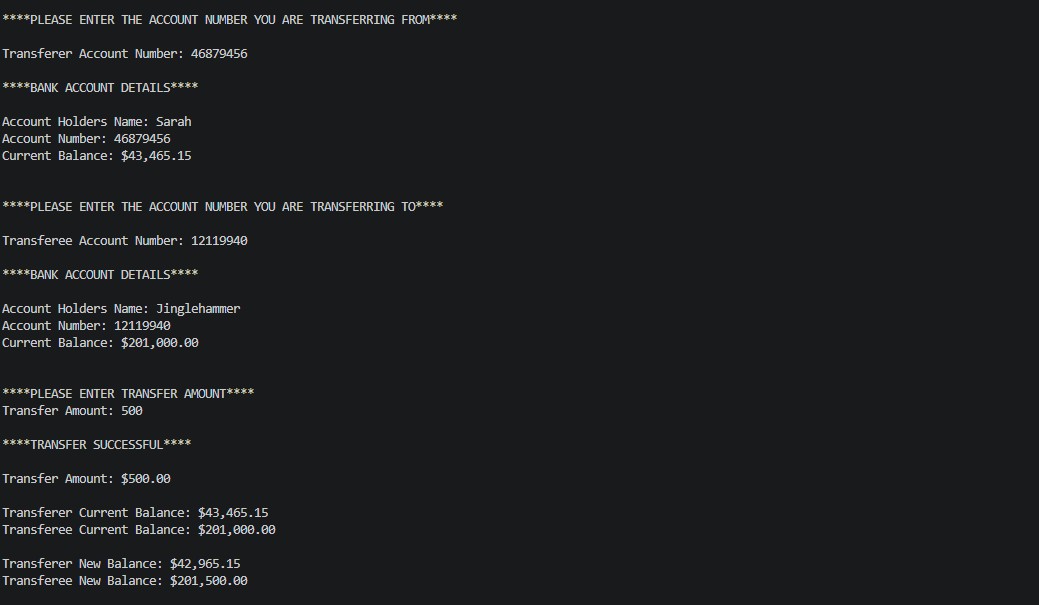
- Transfer money between two accounts with insufficient-funds detection
- Display all accounts in a formatted bank database table
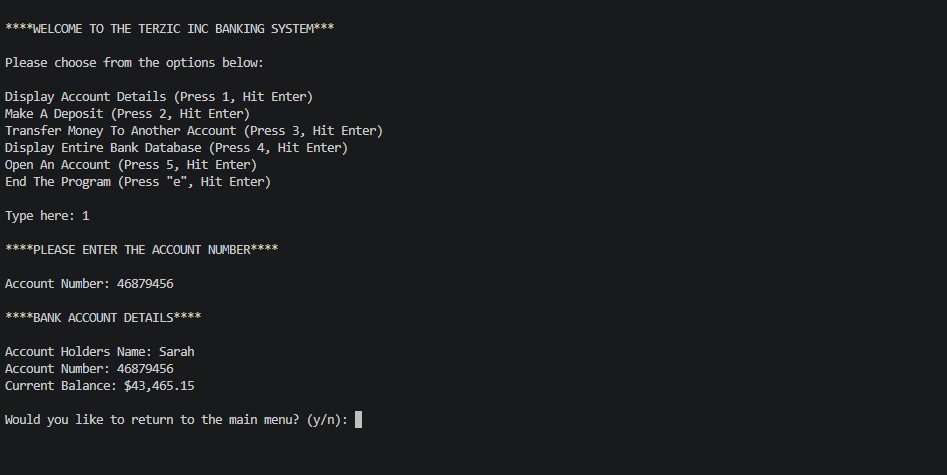
- Lookup and display individual account details by account number
- Comprehensive input validation for names, dollar amounts, menu selections, and account numbers
Screenshots
Show Account Details
Transfer Funds
Code Highlights
public static void TransferMoney(String accountNumberWithdraw, String accountNumberDeposit, double transferAmount) {
    List<String> withdrawInfo = WriteAndReadFiles.ReadFromFile(
        String.format("Bank Accounts\\%s.txt", accountNumberWithdraw));
    List<String> depositInfo = WriteAndReadFiles.ReadFromFile(
        String.format("Bank Accounts\\%s.txt", accountNumberDeposit));

    double withdrawBalance = Double.parseDouble(withdrawInfo.get(2));
    double depositBalance  = Double.parseDouble(depositInfo.get(2));

    transferAmount = Math.round(transferAmount * 100.0) / 100.0;
    double newWithdrawBalance = withdrawBalance - transferAmount;

    if (newWithdrawBalance >= 0.00) {
        double newDepositBalance = Math.round((depositBalance + transferAmount) * 100.0) / 100.0;
        newWithdrawBalance       = Math.round(newWithdrawBalance * 100.0) / 100.0;

        withdrawInfo.set(2, String.valueOf(newWithdrawBalance));
        depositInfo.set(2,  String.valueOf(newDepositBalance));

        WriteAndReadFiles.UpdateFileBalance(
            String.format("Bank Accounts\\%s.txt", accountNumberWithdraw), withdrawInfo);
        WriteAndReadFiles.UpdateFileBalance(
            String.format("Bank Accounts\\%s.txt", accountNumberDeposit),  depositInfo);

        System.out.printf("Transfer of %s successful.%n",
            BankAccount.currencyFormatter.format(transferAmount));
    } else {
        System.out.println("Not enough funds in transferer account. Operation failed.");
    }
}
Challenges & Solutions
Challenge: Preventing duplicate account numbers when a new account is opened.
Solution: After generating a random 8-digit number, the application iterates over every existing account file in the Bank Accounts directory and compares the generated number against stored account numbers before writing the new file.
Challenge: Maintaining floating-point precision across deposit and transfer calculations.
Solution: Every balance update applies Math.round(value * 100.0) / 100.0 immediately after arithmetic to ensure values are always stored and displayed with exactly two decimal places.